
애플리케이션 계층 기초: socket, HTTP, web cache - Computer Networking 2
애플리케이션 계층에서 client-server 구조가 어떻게 동작하는지, socket과 HTTP가 어떤 역할을 하는지, 그리고 web cache가 왜 필요한지 정리합니다.
애플리케이션 계층은 사용자가 실제로 접하는 네트워크 서비스가 어떤 구조로 동작하는지 보여주는 첫 번째 레이어다. 이 글은 client-server 모델, socket, TCP/UDP 서비스, HTTP, cookie, web cache, email의 기본 흐름을 연결해서 정리한다.
What this post covers
- client-server paradigm과 socket의 기본 개념
- HTTP와 TCP/UDP 서비스의 관계
- cookie, web cache, email이 애플리케이션 계층에서 어떤 역할을 하는지
Client-server paradigm
- server:
- always-on host
- permanent IP address
- often in data centers, for scaling
- clients:
- contact, communicate with server
- may have dynamic IP addresses
Sockets
- process sends/receives messages to/from socket
- socket analogous to door
- sending process relies on transport infrastructure on other side of door to deliver message to socket at receiving process
socket interface b/w transfer layer
- 어떻게 process(socket)이 특정되는가?
- IP addr, port-number을 통해
- 예: web-server =
203.252.112.1:80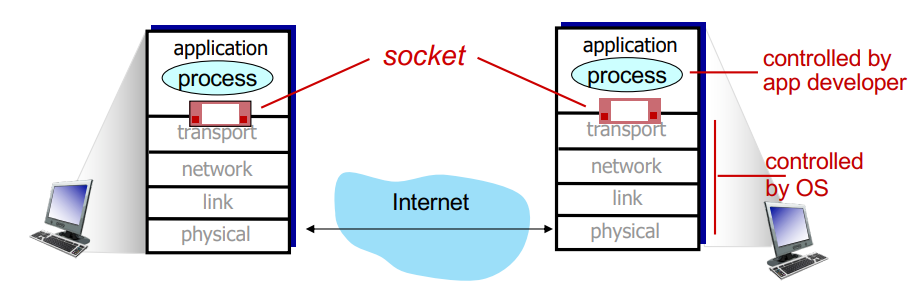
Transport protocols
TCP service
- reliable transport b/w sending and receiving process
- flow control: sender won’t overwhelm receiver
- congestion control: throttle sender when network overloaded
- connections-oriented: setup required b/w client and server processes
- does no provide: timing, security, minimum throughput guarantee
UDP service
- faster, lighter than TCP
- unreliable data transfer
- dose no provide: reliability, flow/congestion control, timing, throughput guarantee or connection setup
Web and HTTP
HTTP
HTTP: hypertext transfer protocol
- Web’s application-layer protocol
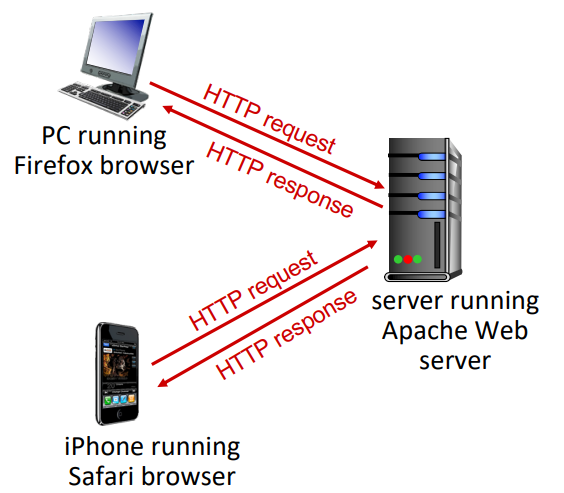
- client/serve model
- client: browser that requests, receives, (using HTTP protocol) and displays Web objects
- server: Web server sends (using HTTP protocol) objects in response to requests
- HTTP uses TCP:
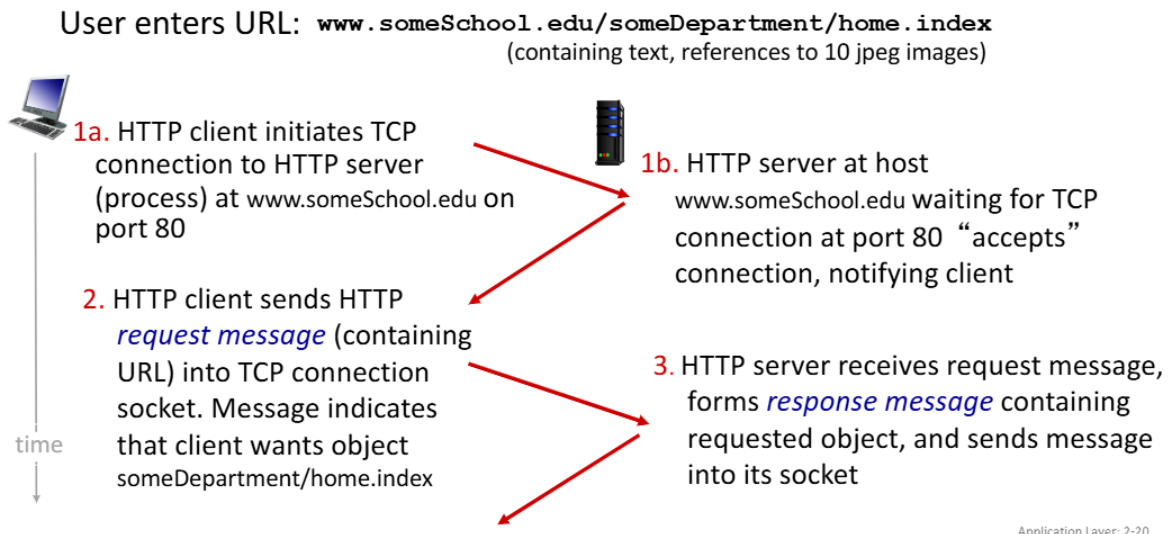
- client initiates TCP connection(creates socket) to server, port 80
- server accepts TCP connection from client
- HTTP messages(application-layer protocol messages) exchanged between browser(HTTP client) and Web server(HTTP server)
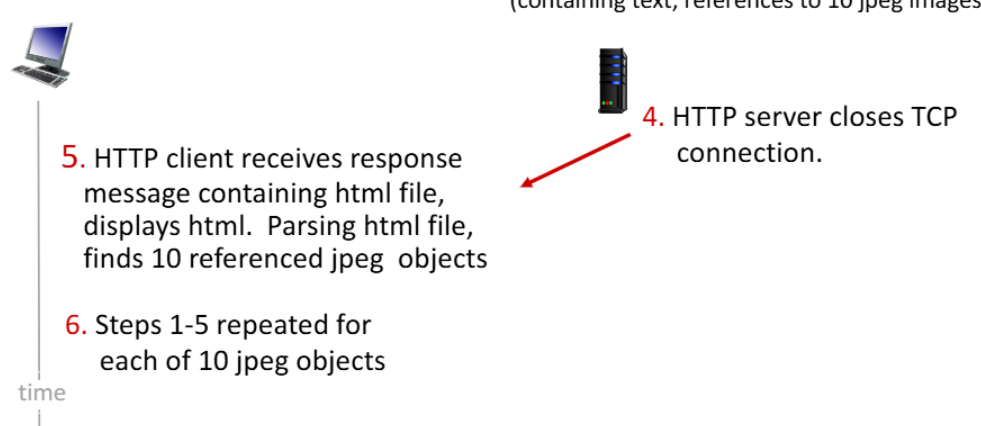
- TCP connection closed
- HTTP is stateless: 이전 요청을 기억하지 않는다.
Non-persistent/persistent HTTP
✅ HTTP가 TCP를 사용하는 방식에는 2가지가 있다.
- Non-persistent HTTP
- TCP connection을 요청이 들어올때마다 생성하고 끝나면 close 2. Persistent HTTP
- 생성된 TCP connection을 계속 사용
- Non-persistent보다 효율적
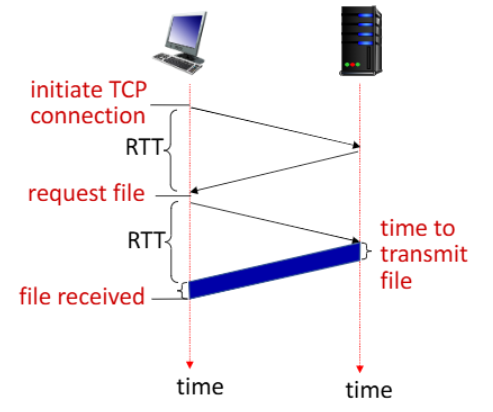
- RTT(Round Trip Time): time for a small packet to travel from client to server and back
- a small packet은 Transmission Delay를 무시한다는 뜻, 단위 패킷당 네트워크 왕복시간 정도로 해석
- Non-persistent HTTP의 경우
- TCP 커넥션을 생성할 때 마다 1RTT가 소요.
- 원하는 오브젝트를 받기위해 1RTT가 소요.
- 즉 Non-persistent HTTP에서 오브젝트 하나당
2RTT+file transmission time가 소요되고 100개라면 200RTT가 소요
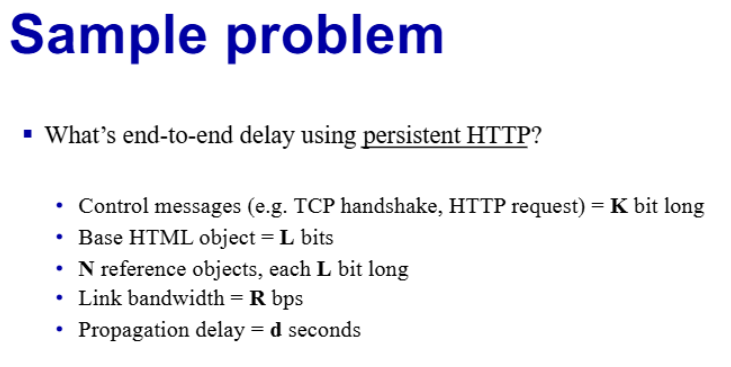
✅ 그래서 HTTP1.1 버전에서는 persistent HTTP를 지원!
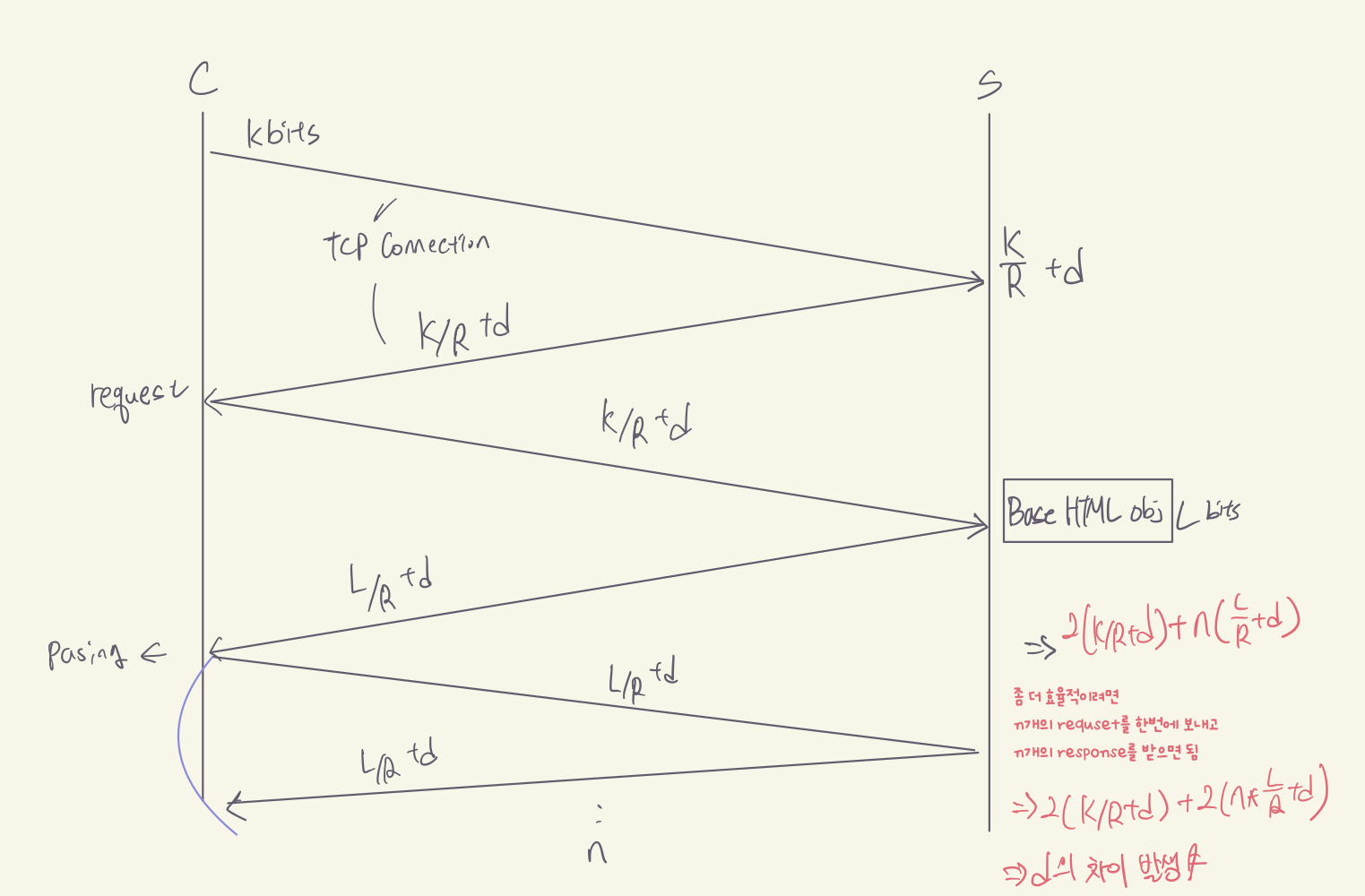
- 서버가 Response를 보낸 후에도 TCP 커넥션을 유지
- 커넥션 연결에 1 RTT, 여러 오브젝트들을 전송하는데 약 1RTT
- 여러개의 오브젝트들을 보낸다해도 2RTT + a의 시간이 걸린다.
HTTP request/response Message
- request message
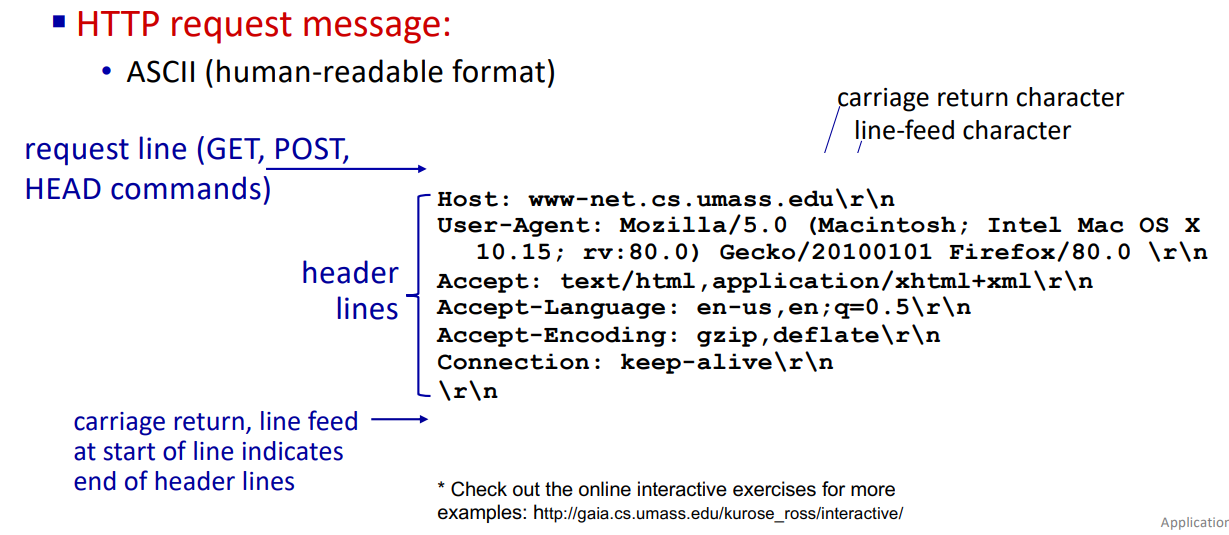
맨 윗줄에
GET /index.html HTTP/1.1\r\n HEAD: 테스트 목적으로, 본문을 받을 필요가 없을 때 사용GET: 조회용 메서드. 파라미터를 URL에?로 연결하여 보낸다.POST: 서버에 처리를 요청할 때 사용하는 메서드PUT: File Upload를 하고 싶을 때 사용- response message
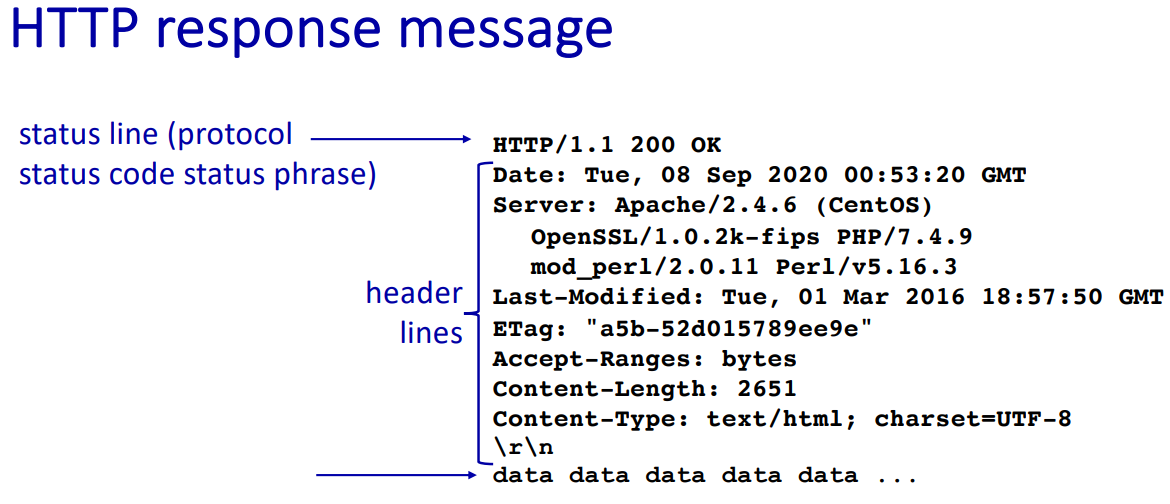
data data data…: data, e.g. http request file
- response status codes:
200: ok300: Moved Permanently400: Bad Request404: Not Found505: HTTP Version Not Supported
- response status codes:
Cookies
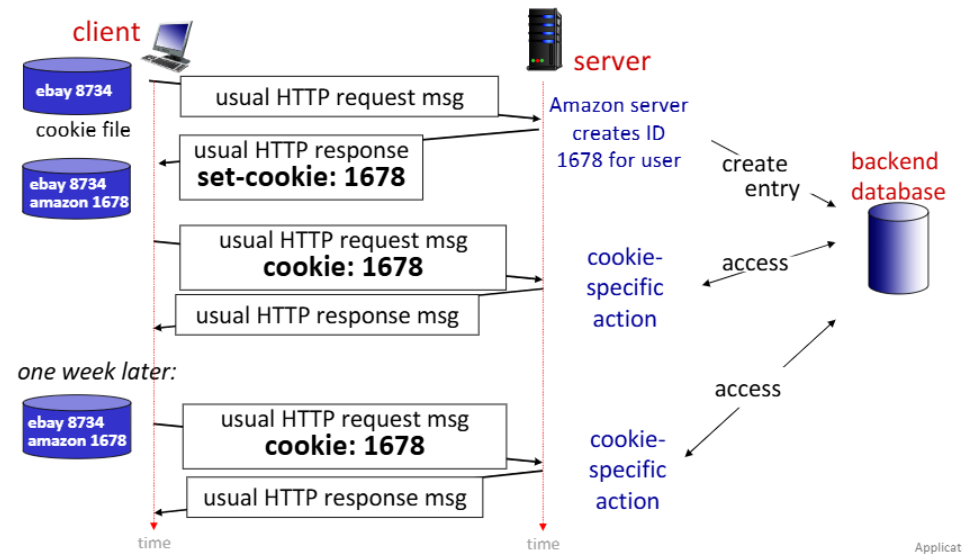
cookie: HTTP의 stateless를 보완하기 위함
- cookie의 four components:
- cookie header line of HTTP response message
- cookie header line in next HTTP request message
- 사용자 브라우저에 의해 관리되는 사용자 호스트에 저장된 쿠키 파일
- back-end database at Web site
Web cache
Web cache: 인터넷에서 자주 접근하는 웹 페이지나 콘텐츠를 임시로 저장해두는 시스템 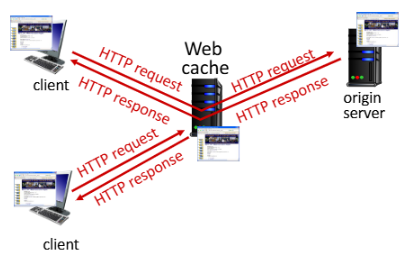
- “중간 저장소”로 작동
클라이언트와 원본 서버 사이에서 데이터를 전달
- operation of Web cache:
- 사용자 설정: user configures browser to point to a (local) Web cache
- 요청 전달: browser sends all HTTP requests to cache
- 캐시 확인:
if object in cache: cache returns object to clientelse: cache requests object from origin server, caches received object, then returns object to client
client가 request하면 server가 아닌 web 프록시(web cache)에서 response할 수 있다. HTTP request를 받았을 때 proxy(web cache)에 정보가 없으면 server에서 프록시로 받아오고 다시 client에게 response한다. 다음 요청에는 proxy에 저장된 정보를 바탕으로 더 빠르게 response할 수 있다.
- Web cache는 server/client 역할을 동시에 수행함.
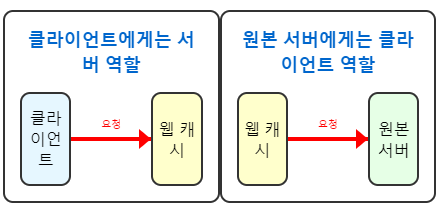
- 또한 origin server는 response header에 캐싱 정책을 명시 가능
Cache-Control: max-age=<seconds>: 해당 시간(초) 동안 캐싱 허용Cache-Control: no-cache: 캐싱 금지
✅Web Caching이 왜 필요한가?
reduce response time: cache is closer to clientreduce trafficon an institution’s access link- Internet is dense with caches: 인터넷에는 많은 캐시가 분산되어 있어 효율적인 콘텐츠 전달이 가능
enables “poor” content providersto more effectively deliver content
- web caching 시나리오
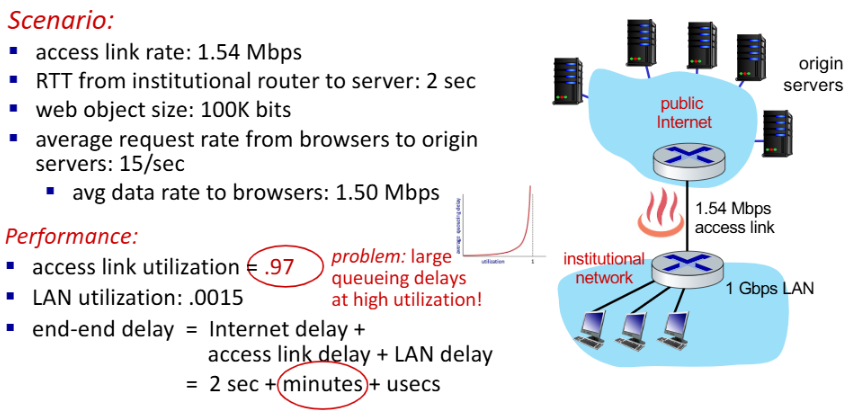
access link 사용률: 97% → 큰 대기열 지연
- 솔루션:
- buy a faster access link
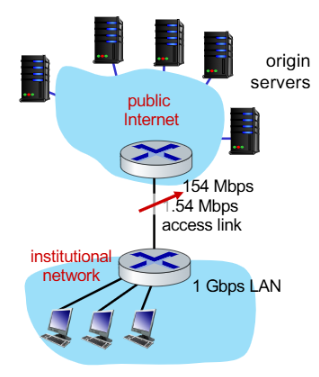
access link: 1.54 Mbps → 154 Mbps (100배 증가)
access link 사용률: 0.97 → 0.0097 (97% → 0.97%)
end-end time = 2초 + 밀리초 + 마이크로초
- buy a faster access link
- 이 방법은 효과적이지만 비용이 많이 드는 해결책
- install a web cache
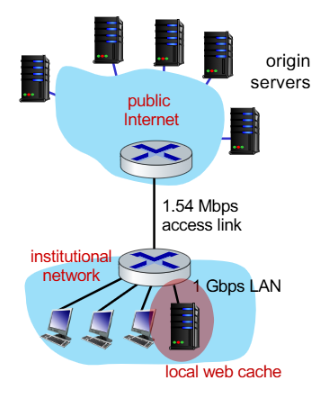
cache hit rate가 40%인 경우 40%의 요청은 캐시에서 낮은 지연 시간(밀리초)으로 처리
60%의 요청은 여전히 원본 서버에서 처리
평균 지연 시간 = 0.6 * (원본 서버에서의 지연) + 0.4 * (캐시에서의 지연)
= 0.6 * (2.01초) + 0.4 * (밀리초) ≈ 1.2초
Conditional GET
📚Conditional GET: client의 cache에 이미 최신 버전의 객체가 있다면, 서버가 객체를 다시 보내지 않도록 하는 것
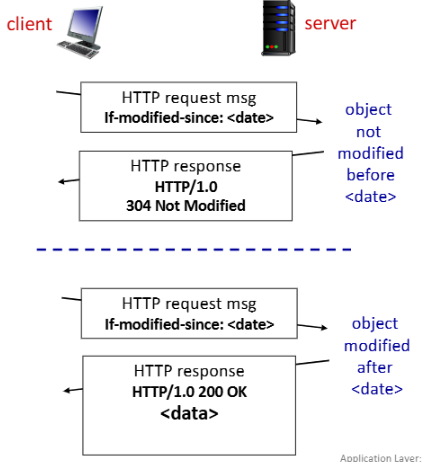 ✅작동 방식:
Client: HTTP 요청에If-modified-since: <date>헤더를 포함하여 자신이 가진 캐시된 버전의 날짜를 명시Server:- 요청받은 객체가 날짜 이후로 변경되지 않았다면 →
HTTP/1.0 304 Not Modified응답 (객체 데이터 없음) - 요청받은 객체가 날짜 이후로 변경되었다면 →
HTTP/1.0 200 OK응답과 함께 새로운 객체 데이터 전송
- 요청받은 객체가 날짜 이후로 변경되지 않았다면 →
HTTP1.1, 2, 3
💻 HTTP/1.1
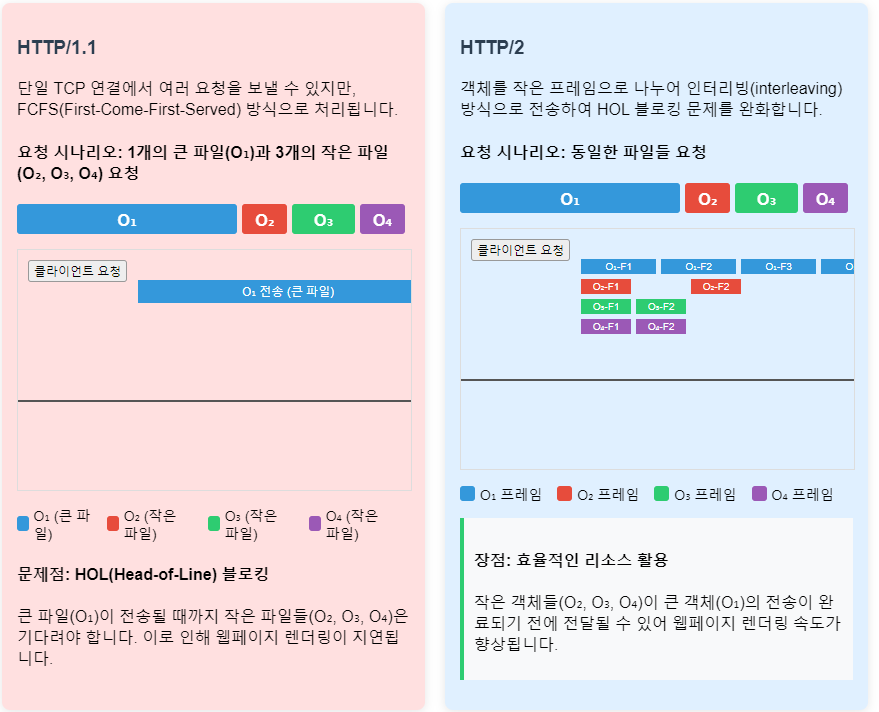
- Pipelining: 단일 TCP 연결에서 여러 GET 요청을 순차적으로 보낼 수 있음
- FCFS(First-Come-First-Served) Scheduling: 서버는 요청 받은 순서대로 응답
- HOL(Head-of-Line) 블로킹 문제 발생:
- 큰 객체 뒤에 작은 객체가 대기해야 하는 상황 발생
- TCP 패킷 손실 시 모든 객체 전송이 지연
💻 HTTP/2
- HTTP/1.1과 호환성 유지
- Priority Scheduling: 클라이언트가 지정한 우선순위에 따라 전송 순서 결정
- Server Push: 클라이언트가 요청하지 않은 객체도 서버가 미리 전송 가능
- 프레임 분할 및 interleaving: 객체를 작은 프레임으로 나누어 전송하여 HOL 블로킹 완화
- 객체를 작은 프레임으로 나누어 interleaving 방식으로 전송
- 큰 객체(예: 비디오 파일)가 전송되는 도중에도 작은 객체(예: CSS, JS 파일)들이 함께 전송가능 → HOL 블로킹 문제를 크게 완화
- HTTP/2 한계
- 단일 TCP 연결에 의존 → 패킷 손실 발생 시 모든 객체 전송이 지연
- TCP 연결 자체에는 기본적인 보안 메커니즘이 없음
💻 HTTP/3
- UDP 기반의
QUIC protocol사용 - 향상된 보안: 기본적으로 암호화 제공
- 객체별 오류 및 혼잡 제어: 하나의 객체 전송 문제가 다른 객체 전송에 영향을 미치지 않음
- more pipelining: 병렬 처리 기능 향상
E-mail, SMTP
E-mail의 3가지 구성요소
- user agent
- mail servers
- SMTP(simple mail transfer protocol)
- user agent:
- a.k.a. “mail reader”
- outgoing, incoming messages stored on server
- mail servers:
- mailbox: contains incoming messages for user
- message queue of outgoing (to be sent) mail messages
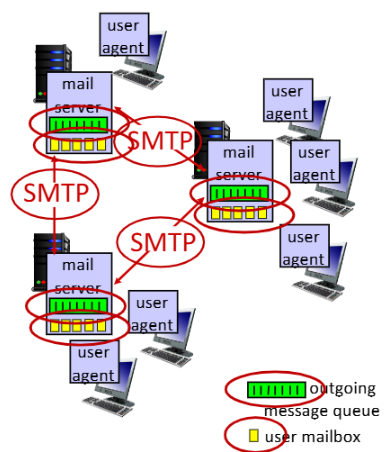
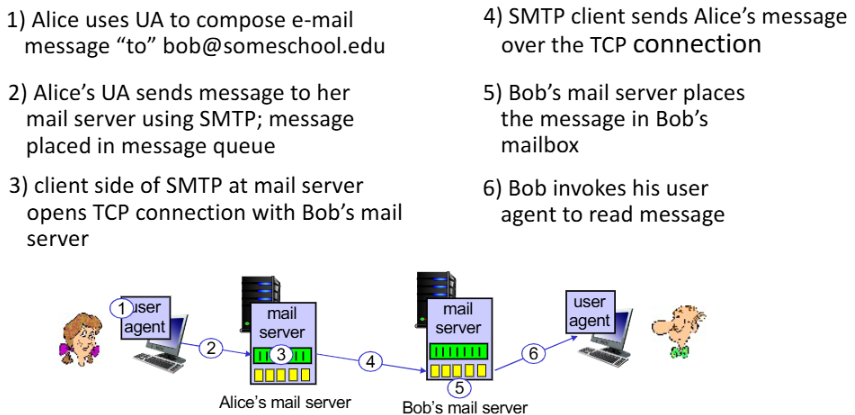
SMTP between mail servers to send email messages
- client: sending mail server
- server: receiving mail server
Key takeaways
- 애플리케이션 계층은 단순히 사용자 기능 모음이 아니라, socket과 transport service 위에서 동작하는 서비스 구조다.
- HTTP, cookie, web cache는 웹이 어떻게 상태와 성능을 다루는지 보여주는 대표 예시다.
- 이 글을 읽고 나면 이후 DNS, P2P, transport layer 주제를 애플리케이션 관점과 연결해서 이해할 수 있다.