
운영체제 서비스와 시스템 콜 인터페이스 - Operating System 2-1
운영체제가 사용자와 프로그램에 어떤 서비스를 제공하는지, 시스템 콜과 인터페이스가 왜 핵심인지, 링크와 로더가 실행 흐름에서 어떤 역할을 하는지 정리합니다.
🍀 운영체제 전공 수업 정리
Operating System Services
📚 OS Provide an environment for the execution of programs and services to programs and users
- Helpful Services to Users
- UI(User Interface)
- Almost all OSes provide a user interface
- Types of UI:
- Command-Line interface(CLI)
- Graphics User interface(GUI)
- touch-screen
- Batch: 일괄 처리 방식
- Program execution
- OS must be able to load programs into memory, run them, and terminate them
- termination can be normal or abnormal(indicating error)
- I/O operations
- Running programs may require I/O operations(Ex: File access, I/O device control)
- File-system manipulation
- OS provides file management services for programs
- Key function:
- Reading/Writing files and directories
- Creating and deleting files
- Searching and listing file information
- Managing file permissions
- Communication
- Processes exchange information either on the same computer or over a network
- Communication methods:
- Shared Memory: Multiple processes share a common memory space to communicate
- Message Passing: The OS moves packets to facilitate communication(ex: email)
- Error detection
- The OS must continuously monitor and detect errors in the system
- OS 역할:
- 오류 감지 후 적절한 조치 수행
- 오류가 발생해도 시스템이 올바르게 유지되도록 보장
- 디버깅 기능 제공: 사용자 및 개발자의 문제 해결 능력 향상
- Resource allocation
- 여러 사용자 혹은 여러 개의 많은 프로그램이나 장치를 동시에 돌릴 때, 시스템 리소스는 한정적임
- 그래서 시스템 리소스를 적절하게 할당해야함
- Key resources managed by the OS:
- CPU cycle: CPU를 최대한 배분해서 GPU의 활용률을 높여야함
- main memory
- file storage
- I/O device
- Logging
- Tracks which users consume how many resources
- Helps optimize system performance and security
- Protection and security
- 멀티유저 시스템 및 네트워크 환경에서 정보 소유자가 데이터 사용을 제어할 수 있도록 보장
- 동시에 실행되는 프로세스들이 서로 간섭하지 않도록 보호
- protection과 security는 다른 개념
- protection: Ensures controlled access to system resources
- security:
- Protects the system from unauthorized access(requires user authentication)
- Defends I/O devices from unauthorized access attempts
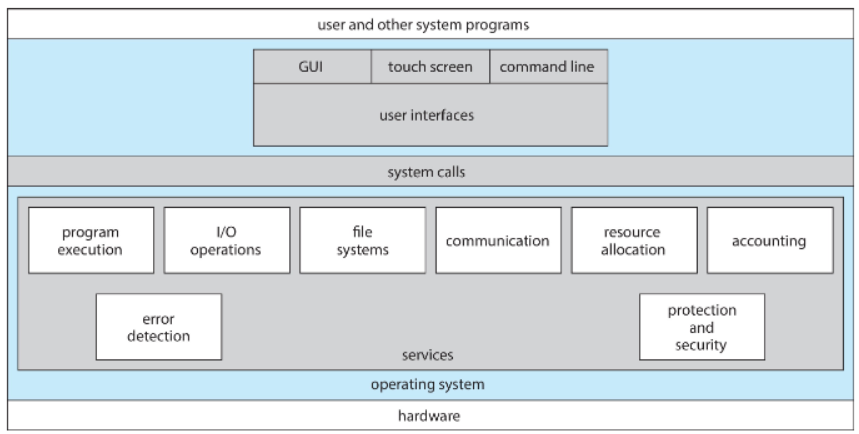
View of Operating_System_Service
- UI(User Interface)
User and Operating System-Interface
CLI(Command Line Interface)
📚 CLI or Command interpreter: 사용자가 직접 명령을 입력하여 운영체제와 상호작용할 수 있도록 하는 인터페이스
- 커널 내부에서 구현될 수도 있고, 시스템 프로그램으로 구현될 수도 있음.
- CLI는 여러 형태로 구현될 수 있으며, 이를 Shells이라고 함.
- Types of CLI Commands:
- Built-in Commands(내장 명령어)
- Commands that are part of the shell itself(Ex:
cd,echo,exit)
- Commands that are part of the shell itself(Ex:
- Externel programs(외부 프로그램 호출)
- The shell executes external programs(Ex:
ls,grep,vim) - Adding new features does not require modifying the shell
- The shell executes external programs(Ex:
- Built-in Commands(내장 명령어)
GUI(Graphical User Interface)
📚 GUI: A desktop metaphor interface, designed for user-friendly interaction
- 보통 마우스, 키보드, 모니터를 사용하여 조작
- GUI Components:
- Icons: Represent files, programs, and actions
- Mouse interactions: Provide Options, execute functions, open folders, etc
- Invented at Xerox PARC
- Modern systems offer **both CLI and GUI**
- Example:
- Microsoft Windows → Primarily GUI, but includes CLI
- Apple Mac OS X → Uses Aqua GUI, but supports CLI with UNIX shell
- Unix and Linux → Primarily CLI, but support GUI options like CDE, KDE, and GNOME
- 주요 GUI 환경:
- KDE(K Desktop Environment) → Linux 기반의 데스크톱 환경.
- GNOME(Gnu Network Object Model Environment) → Linux 및 Unix 시스템에서 사용되는 GUI 환경, 리눅스의 Graphical User Interface는
GNOME - CDE(Common Desktop Environment) → LUnix 시스템에서 사용되는 GUI 환경
Touchscreen Interface
- Touchscreen devices require new interfaces
- Mouse not possible or not desired
- Actions and selection based on gestures
- Virtual keyboard for text entry
System Calls(⭐)
📚 System Calls:
- **Programming interface** to access services provided by the OS
- Typically written in high-level languages like C or C++
- Programs do not use direct system calls
- Instead, they access system services through high-level API(Application Programming Interface)
- Common API Types: Win32 API(for Windows), POSIX API(for UNIX, Linux, macOS 등의 POSIX-baseed system), JAVA API(for Java Virtual Machine(JVM))
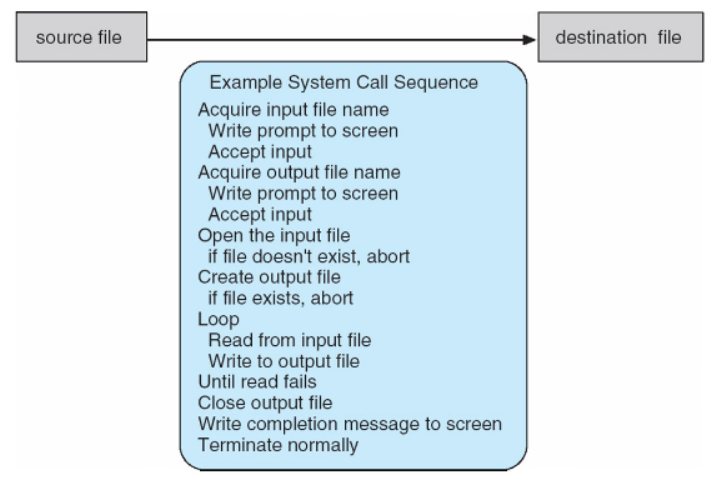
System call sequence to copy the contents of one file to another file
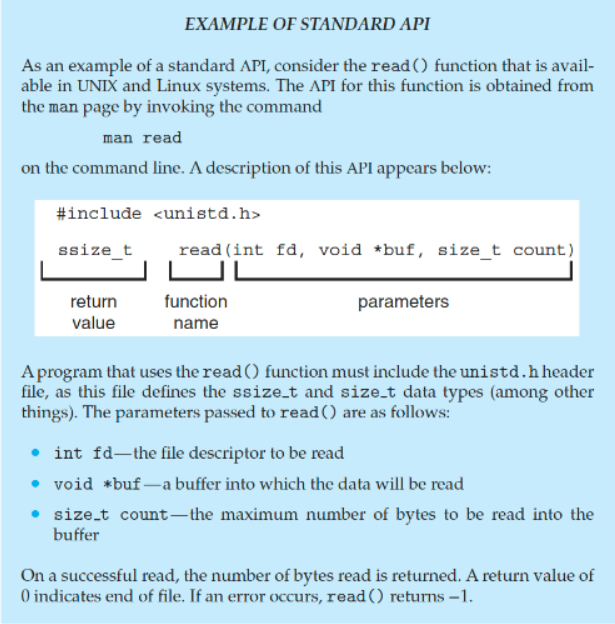
Example of Standard API
read()
System Call Implementation
- 각 시스템 호출은 특정 숫자와 연관됨
- System-call interface maintains a table indexed by these number
- Role of system call interface
- System call interface invokes(호출) the intended system call in the OS kernel
- Returns the status of the system call and any return values
- Caller Does Not Need to Know Implementation
- The caller need know nothing about how the system call is implemented
- It only needs to follow the API and understand the expected results
- Most OS interface details are hidden from the programmer by API(information encapsulation/정보 은닉화)
- System calls are managed by run-time support library(컴파일러와 함께 제공되는 라이브러리)
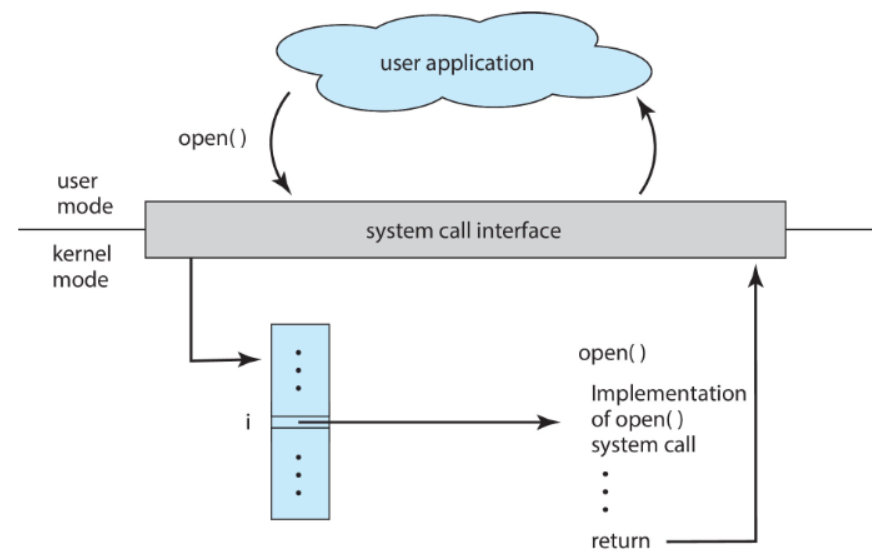
open()시스템 콜을 요청하면 번호에 따라서 table에 mapping을 한다
그리고 그 인덱스에 있는 주소값을 따라 코드를 실행하고 리턴을 해준다
System Call Parameter Passing
- System Calls often require more information
Exact type and number of parameters vary depending on OS and system call
- Three Methods for Passing Parameters to the OS
- (1) Registers
- register에 parameter를 저장하여 전달, 가장 간단하고 빠름(CPU가 가장 빨리 접근 가능하기 때문)
- table이나 block 같은 큰 파라미터를 전달하기에는 register 용량의 한계가 있음
- (2) Address of Block/Table
- Parameters are stored in a block(or table) in memory
- The **address** of the block is passed in a register (
Call by referenceof C/C++) - Used by Linux and Solaris
- (3) Stack
- Parameters are pushed onto the stack by the program
- The OS pops them from the stack to retrieve the values
- Block and stack methods do not limit the number or length of parameters
- (1) Registers
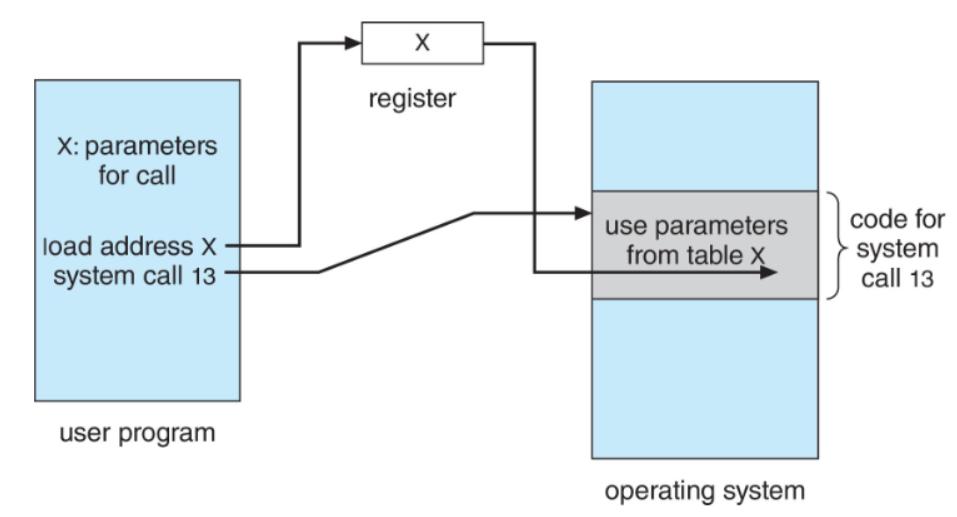
1번째 라인은 register, 2번째는 x주소의 table을 passing한 라인
Types of System Calls
Process control
create/terminateprocessend,abortload,executeget/setprocess attributes- wait for time
- wait event, signal event
- allocate and free memory
- Dump memory error
- Debugger for determining bugs, single step execution
- Locks for managing access to shared data b/w processes
- 다중 프로세스 환경에서 공유 데이터에 대한 동시 접근을 방지(Lock)
- 여러 process가 같은 데이터에 read/write를 한다면 데이터가 엉키기때문
File management
- Device management의 추상화(상위 개념)
Create/deletefileopen/closefileread,write,repositiongetandsetfile attributes
Device management
request/releasedeviceread,write,repositiongetandsetdevice attributes- logically
attachordetachdevices
Information maintenance
get/settime or dateget/setsystem datagetandsetprocess, file, or device attributes
Communications
create,deletecommunication connectionsend,receivemessages- message passing model: to send messages to a host name or process name(Ex: client → server)
- Shared-memory model: Allows processes to create and access shared memory
transfer status informationattachanddetachremote(원격) devices
Protection
- Control access to resources
getandsetpermissionsallowanddenyuser access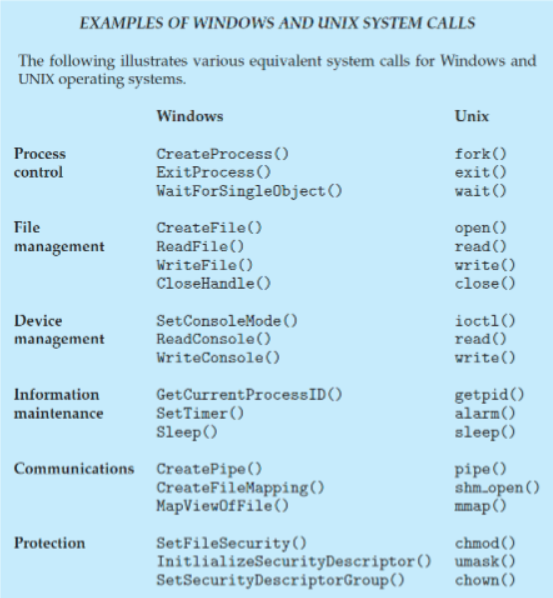
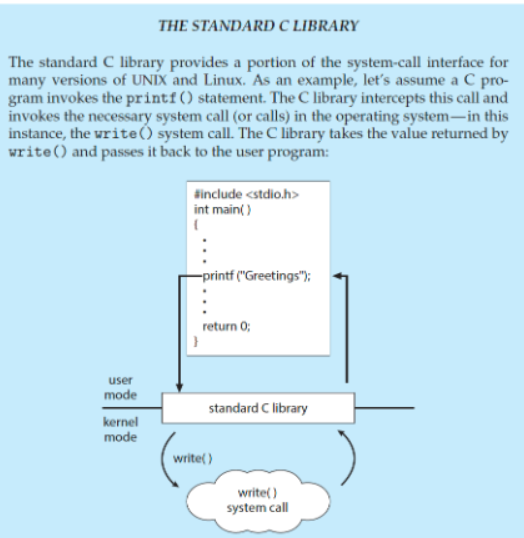
printf를 쓰게 되면 I/O가 발생되어 OS service를 받게 됨printf의write라는 system call을 사용함 (직접 write를 쓰려면 fd, buf등을 직접 지정해야하기 때문에 번거로움)
System Services(=System Utilities)
📚OS는 System Programs(=System Utilities)을 통해 다양한 서비스를 제공하여 편리한 실행 환경(convenient environment)을 조성함
- 대부분의 유저들은 OS를
system call이 아닌system programs로 정의된다.
- File manipulation
Create,delete,copy,rename,print,dump, andlistfiles
- Status Information
- Retrieve system info(date, time, memory, disk space, users)
- Performance monitoring, logging, debugging
- Uses registry to store and retrieve configuration information(설정 정보)
- File Modification
- Provide Text editors to create and modify files
- Commands to
searchandtransformtext content
- Programming-Language Support
- Includes
compilers,assemblers,debuggers,interpreters
- Includes
- Program Loading and Execution
- Uses loaders, linkage editors, and debugging systems
- Communications
- Provides virtual connections among processes, users, and systems
- Enables messaging, remote login, and file transfers
- Background Services
- 시스템 부팅 시 자동으로 실행됨
- 일부 서비스는 시스템 시작 후 종료되며, 일부는 계속 실행됨
- Includes disk checking, process scheduling, error logging, and printing
- Runs in user context, not kernel context(커널 exec → background service exec)
- Known as services, subsystems, daemons
- Application Programs
- User-executed programs that are not part of the OS
- Launched via command-line, mouse clicks, or other user interactions
Linkers and Loaders (⭐)
Linkers
- Source code is compiled into relocatable object files
- relocatable object file: 절대 주소값이 아니라 상대 주소/심볼링 주소를 사용해서 어느 메모리에나 재배치가 가능한 object file
- Linker combines multiple object files into a single executable file
- Also includes libraries(‘s code) if necessary
Loaders
- Executable file is stored in secondary storage
- 실행을 위해 반드시 loader가 memory에 적재해야 함
memory에 적재하기 위해 relocation과정에서 program의 final addresses를 assign하고, 그 address에 맞게 code와 data를 수정함
- Dynamically Linked Libraries(DLLs)
- 프로그램들은 거의 다 표준 라이브러리를 사용함
- 프로그램마다 표준 라이브러리를 가져오는 비효율을 없애기 위해 라이브러리를 share하기로 함
- Modern OSs don’t embed libraries into executables
- DLLs를 사용하여 **필요할 때만 적재**하고, 여러 프로그램에서 **shared**
- The OS knows how to load and execute programs based on standard formats(표준 실행 파일 형식)
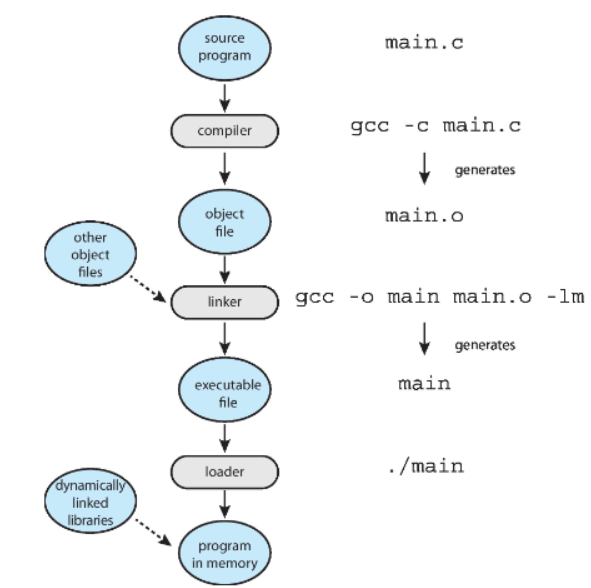
link and loader’s role
✅ Why Applications Are Operating System Specific
- A program compiled on one OS usually does not run on another
- Each OS has unique system calls and file formats 그럼 OS 관계없이 돌아가는 프로그램은 없는가?
- Multi-Operating System Apps
- interpreted languages(e.g.,
Python,Ruby) - VM-based languages(e.g.,
Java) - standard languages(e.g.,
C) and compile separately for each OS
- interpreted languages(e.g.,
- Application Binary Interface(ABI)
- API처럼 CPU 및 OS 환경에서 binary code가 interact하는 방식을 정의