
운영체제의 동작 원리와 자원 관리 - Operating System 1-2
운영체제가 어떻게 부팅되고 동작하는지, 자원 관리와 멀티프로그래밍이 왜 중요한지, 가상 메모리와 시분할 개념이 어디서 시작되는지 정리합니다.
🍀 운영체제 전공 수업 정리
OS-Operations
- Bootstrap program - simple code to initialize the system, load the kernel(컴퓨터를 초기화(부팅)하는 역할을 하는 간단한 코드)
- Kernel load
- Starts system daemons
- 백그라운드에서 실행되는 서비스 프로그램
- 커널이 로드된 후, system daemons가 실행되며 운영 체제의 주요 기능을 담당
- 커널 외부에서 제공되는 서비스들로, OS가 정상적으로 동작하도록 지원
- Kernel interrupt driven(기반)
- Hardware interrupt by one of the devices - 컴퓨터의 device가 CPU에게 작업 요청을 보낼 때 발생
- ex: 키보드를 누르면 CPU가 이를 감지하고 입력을 처리, 하드디스크에서 데이터를 읽을 때 CPU에게 완료 신호를 보냄
- Software interrupt (exception or trap)- Software에서 특정한 이벤트가 발생할 경우 CPU가 처리하는 interrupt (동기적임/ ctrl+c 같은 외부 interrupt는 비동기적)
- software error (ex: Division by Zero, Segmentation Fault)
- system call - Request for OS service(프로그램이 운영 체제의 기능을 사용하기 위해)
- ex: 파일 읽기/쓰기(
read(),write()), 프로세스 생성(fork()), 메모리 할당(malloc())
- Other process problems
- ex: Infinite loop, processes modifying each other or the operating system
- Hardware interrupt by one of the devices - 컴퓨터의 device가 CPU에게 작업 요청을 보낼 때 발생
Multiprogramming and Multitasking
- Multiprogramming (Batch System)
- Single user cannot keep CPU and I/O devices busy at all times(병원 진료처럼)
- 여러 개의 작업(code, data)을 관리하여 CPU always has one to execute(CPU가 항상 실행할 작업을 가질 수 있도록 함)
- 특징:
- A subset of total jobs in system is kept in memory
- One job selected and run via job scheduling
- When it has to wait (for I/O for example), OS switches to another job (다른 작업으로 전환하여 CPU가 놀지 않도록 함)
- Timesharing (multitasking)
- logical extension in which CPU switches jobs so frequently that users can interact with each job while it is running, creating interactive computing
- 특징:
- Response time should be < 1 second
- Each user has at least one program executing in memory -> process
- If several jobs ready to run at the same time -> CPU scheduling (CPU scheduling을 통해 여러 개의 준비된 작업 중 하나를 선택 후 실행)
- If processes don’t fit in memory, swapping moves them in and out to run
- Virtual memory allows execution of processes not completely in memory
Multiprogramming vs Multitasking 비교
| 개념 | Multiprogramming | Multitasking |
|---|---|---|
| 방식 | 하나의 프로그램이 CPU를 점유하면, 다른 프로그램은 대기 | CPU가 여러 작업을 빠르게 전환, 동시에 실행되는 것처럼 |
| 목적 | CPU가 항상 작업을 실행하도록 유지 | 사용자가 여러 프로그램을 동시에 사용할 수 있도록 지원 |
| CPU 활용 | CPU가 놀지 않도록 I/O 작업이 끝날 때까지 다른 작업을 실행 | 사용자가 실행하는 여러 개의 프로그램을 빠르게 전환 |
| 반응 속도 | 즉각적이지 않음 (배치 처리) | < 1초 (즉각적인 반응) |
| 대표 사례 | Batch System (병원 진료 예약) | 운영체제에서 여러 프로그램 실행 (Windows, macOS) |
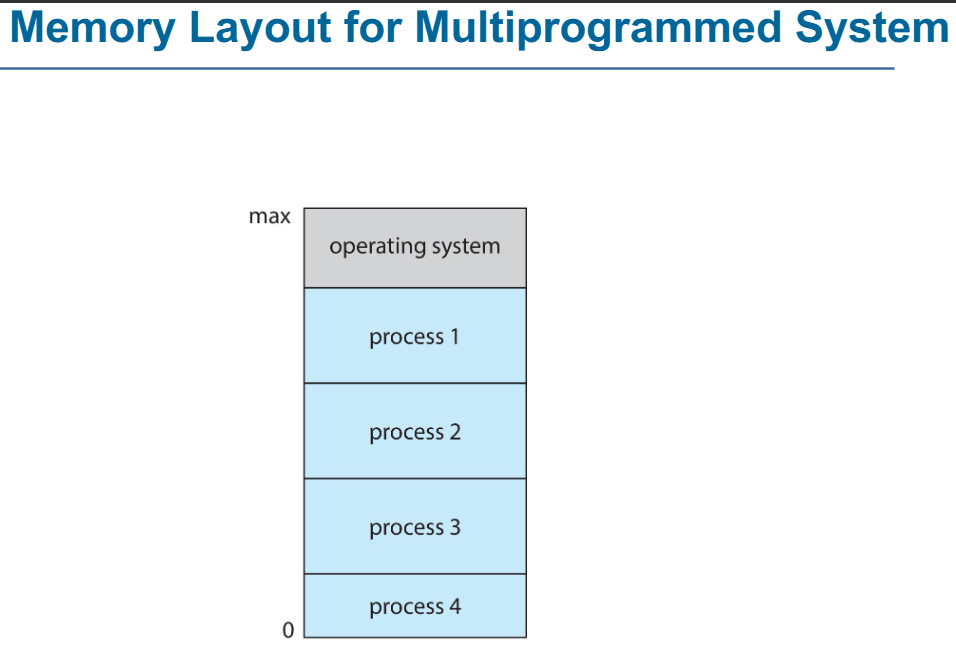
- 메모리는 OS 영역, User Process 영역으로 나뉨
- OS는 메모리의 max 주소에서 실행되며, 시스템을 제어하고 관리한다
- 사용자 프로세스(Process 1, 2, 3, 4)는 메모리의 하단부터 위쪽 방향으로 로드됨
(즉, 프로세스는 주소 0에서 시작하여 위쪽으로 할당됨) - 다중 프로그래밍 시스템에서는 여러 개의 프로세스가 동시에 메모리에 적재되어 CPU가 작업을 교체하며 실행할 수 있음
Dual-mode and Multimode Operation
Dual-mode operation allows OS ot protect itself and other system components
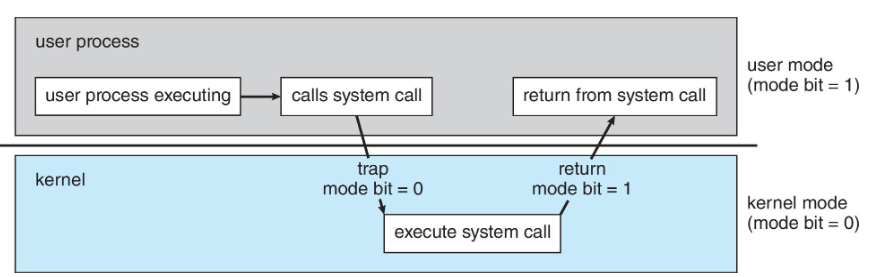
- 운영체제를 보호하기 위해 CPU는 두가지 모드에서 작동:
- User mode: 일반 사용자 응용 프로그램 실행
- Kernel mode: OS가 실행, 하드웨어 및 시스템 리소스에 대한 전체 권한을 가짐(priviledged mode, supervised mode, system mode)
- Mode bit: provided by hardware
- Provides ability to distinguis when system is running user code or kernel code
- 운영체제는 mode bit를 확인하여 시스템 보호를 수행
Privileged Instruction only executable in kernel mode
- Increasingly CPUs support multi-mode operations
- Virtual Machine Manager(VMM) 모드 지원
- VMM has more priviledges than user processes but fewer than the kernel
Transition from User to kernel Mode
Timer to prevent infinite loop / process hogging resources
- Timer Set: To interrupt the computer after some time period
- Keep Counter: Decremented(감소) by the physical clock
- Operating system set the counter (privileged instruction으로만 가능)
- When counter zero, generate an interrup
Set up before scheduling process to regain control or terminate program that exceeds allotted time
- 작동 방식
User Mode에서 실행 중인 프로세스가 System Call(ex: 파일 읽기, 네트워크 요청, 메모리 할당 등)- 사용자가 System Call → CPU는
trap발동 -> Kernel mode로 변경됨(mode bit = 0) - 작업 완료 후 다시 User Mode로 변경됨
(mode bit = 1)
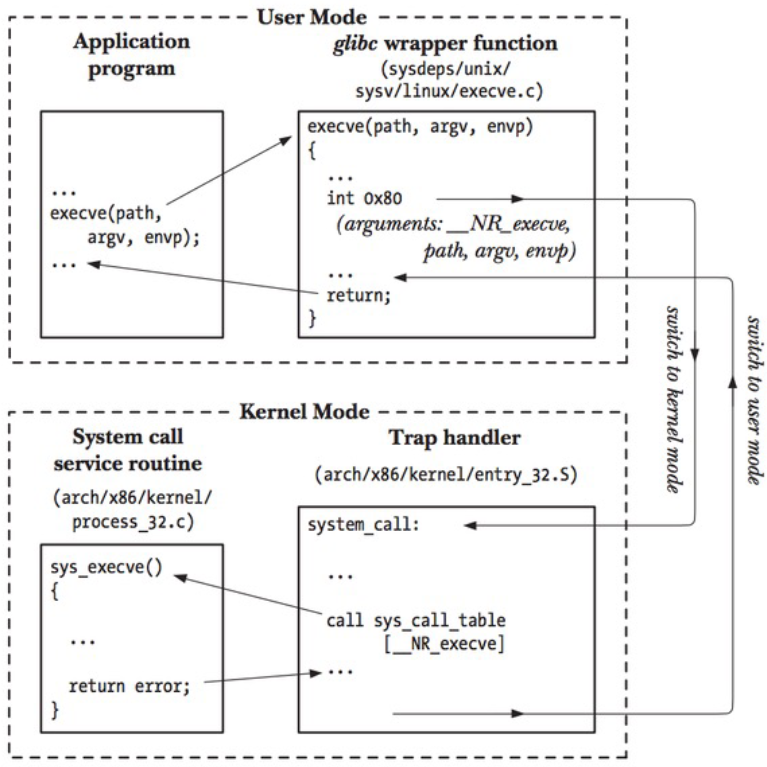
mechanism
Resource Management
Process Management
- Process란?
- 실행 중인 프로그램
- Program은 단순한 코드(passive entity), Process는 실행 중인 코드(active entity)
- Process needs resources to accomplish its task
- CPU, memory, I/O, files, Initialization data
- Process termination(종료) requires reclaim of any reusable resources
- 즉, OS는 종료된 process가 자원을 차지하지 않도록 해제해야 함
Single-threadedvsMulti-threaded
|——|——| | Single-threaded | 하나의 프로세스는 하나의 Program Counter 만 가짐 | | ——————- |한 번에 한 개의 명령어만 실행 가능 (순차적 실행) | | Multi-threaded | 하나의 프로세스가 여러 개의 스레드를 가짐 | | —————— |각 스레드는 독립적인 Program Counter를 가지며, 병렬 실행 가능 |Concurrency(동시성)
- OS는 여러 개의 process를 동시에 실행
- 일부 프로세스는 User process, 일부는 OS process
- Concurrency by Multiplexing
- CPU는 여러 process를 빠르게 Scheduling(전환)하며 실행(동시에 실행하는 것처럼 보이게)
Process Management Activities
- Creating and deleting both user and system processes
- Suspending and resuming processes
- Providing mechanisms for process synchronization(데이터의 일관성을 위해)
- Providing mechanisms for process communication
- Providing mechanisms for deadlock handling
Memory Management
- To execute a program, all (or part) of the instructions(명령어) must be in memory
- All (or part) of the data that is needed by the program must be in memory
- Memory management determines what is in memory and when
- Optimizing CPU utilization and computer response to users
✅ Memory management activities
- memory 사용 추적 * Keeping track of which parts of memory are currently being used and by whom
- process 관리 * Deciding which processes (or parts thereof) and data to move into and out of memory
- memory 공간 할당 및 해제 * Allocating and deallocating memory space as needed
File-system Management
- OS provides uniform, logical view of information storage
(일관되고 논리적으로 정보를 저장, 관리) - Abstracts physical properties to logical storage unit - file
- Each medium is controlled by device (ex: disk drive, tape drive)
- Varying properties:
- Access speed
- Capacity
- Data transfer rate
- Access method(sequantial or random)
- Varying properties:
**File-system management**:
- Files usually organized into directories
- Access control: most systems use access control to determine who can access what
- OS activities include:
- Creating and deleting files and directories
- Primitives(기본 기능) to manipulate files and directories
- Mapping files onto secondary storage
- Mapping: 사용자가 지정한 파일 이름을 저장장치의 실제 위치로 연결해주는 과정
- Backup files onto stable(non-volatile) storage media
Mass-storage management
📚What is Mass-storage?
- Stores data that cannot fit in main memory or needs to be kept for a long period.
(i.e. Hard disk, SSD, optical disk, magnatic tapes)
✅ OS management Activities
- Mounting/Unmounting: Connecting and disconnecting storage devices
- Free-space Management: Managing available storage space
- Storage allocation
- Disk scheduling: Optimizing input/output operations
- Partitioning: Dividing disks into separate sections
- Protection
- Optical storage, magnetic tapes are slower but requre management by the OS or applications.
Caching(⭐)
- Caching is an important concpet applied at multiple levels in a computer(H/W, OS, S/W)
📚 Principle of Caching
- Temporarily copying data from slower to faster storage(cache) for quicker access
✅ Caching works
- When accessing data, the system checks the cache first
- If found → Use it directly from cache(fast)
- If not → Copy from slow storage to cache, then use it
📝 Why need Cache Management
- Cache smaller than storage being cached, so efficient management is key
- Design factors:
- Cache size
- Replacement policy(Which data to remove when the cache is full)
Type of Storage
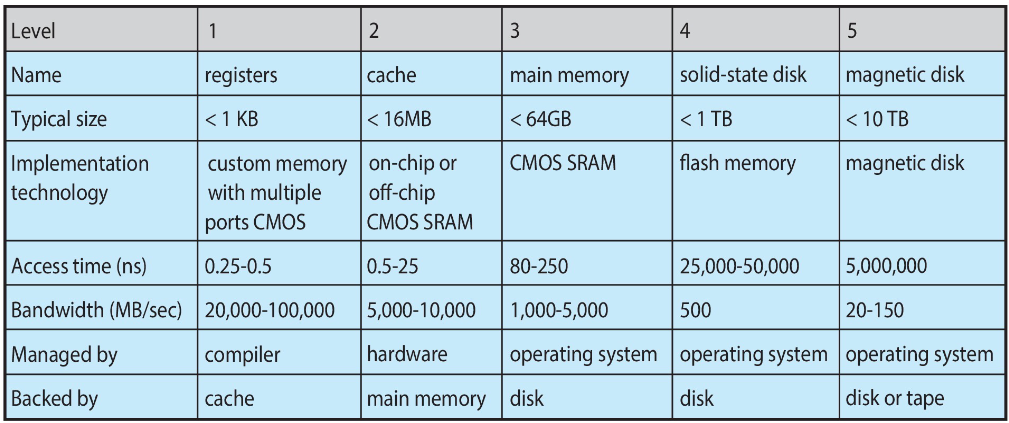
- lower levels(registers, cache) are faster but smaller, while higher levels(SSD, HDD) are slower but larger
- registers are inside the CPU, extremely fast but small
- cache is close to the CPU, faster than main memory but smaller
- main memory(RAM) holds data during program execution
- SSD is faster than HDD but slower than RAM
- magnetic disk(HDD) is the slowest but offers the largest storage capacity\
Data Migration Process

Data Migration Process
- Multitasking Environment
- The system must always use the most recent data, regardless of where it is stored in the storage hierarchy
- Multiprocessor Environment
- Requires cache coherency(일관성) to ensure that all CPUs have the most recent data in their cache
- Distributed Environment
- The situation is even more complex
- Multiple copies of the same data can exist, requiring proper management strategies
I/O subsystem
- OS is to hide peculiarities of hardware devices from the user
✅ Responsibilities of the I/O Subsystem
- Memory Management for I/O:
- Buffering: Temporarily stores data while it’s being transferred
- Caching: Stores parts of data in faster storage for better performance
- Spooling: Manages overlapping of job outputs and inputs by placing I/O data in a buffer
(It refers to putting data of various I/O jobs in a buffer.)
- Provides a General Device-Driver Interface
- Ensures that hardware can communicate with the OS
- Drivers for Specific Hardware Devices
Protection and Security
📚Protection
- Mechanisms for controlling access to processes or resources as defined by the OS
📚Security
- Defense against internal and external attacks Types of attacks include:
- denial-of-service(DoS)
- worms and viruses
- identity Theft
- Theft of Service
- User Identification and Management
- Systems distinguish among users, to determine who can do what
- User ID
- Include usernames and unique IDs(one per user)
- Linked to files and processes for access control(ID는 사용자의 file과 process에 연결되어 access control를 결정)
- Group ID
- Allow management of user groups for access rights
- Associated with processes and files
- Privilege Escalation(권한 상승)
- Allows users to switch to an effective ID with higher rights
Virtualization
📚What is virtualization
- Technology that allows an OS to run applications within other OSes
- ✅ Emulation: Used when the source CPU type is different from the target type (i.e. PowerPC → Intel x86 → M1 / Apple의 Rosetta)
- Generally the slowest method
- If the computer language is not compiled to native code(CPU가 직접 실행할 수 있는 기계어(바이너리 코드)), it uses interpretation(소스 코드를 한 줄씩 해석하고 실행하는 방식)
✅ Virtualization
- OS is natively compiled for the CPU, and it runs guest OSes that are also natively compiled Example:
- Running Windows XP guests on VMware, with the host OS being Windows XP.
- VMM (Virtual Machine Manager)
- Software that provides virtualization services (e.g., VMware, VirtualBox).
✅ Use case of virtualization
- Used for exploring and ensuring compatibility(호환성) when running multiple OSes Examples:
- Running Mac OS X as the host and Windows as the guest on an Apple laptop
- Developing apps for multiple OSes without owning multiple systems → Performing QA testing
- Executing and managing compute environments within data centers
✅ Native Execution of VMM
- If VMM runs natively, it acts as the host OS itself
- In this case, there is no general-purpose host OS (ex: VMware ESX, Citrix XenServer) → VMM자체가 host
Computing Environment - virtualization
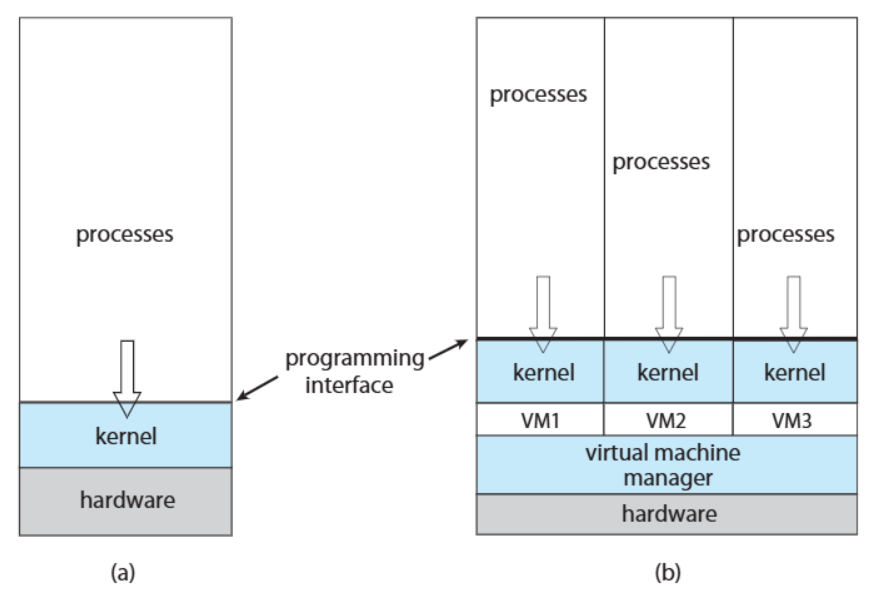
Computing Environment - virtualization
- The VMM manages multiple VMs, and each VM operates independently with its own kernel and processes
- This allows multiple OSes to run simultaneously on a single hardware system.
- VMM = Host OS
| 구분 | Computing Environment-Non-virtualized(a) | Computing Environment-Virtualized(b) |
|---|---|---|
| Kernel | 단일 커널 사용 | 각 VM이 개별 커널 사용 |
| Process | 단일 OS의 프로세스 | 각 VM이 독립적인 프로세스 실행 |
| Management | 하드웨어를 커널이 직접 관리 | VMM이 하드웨어 자원을 관리하고 VM에 할당 |
Distributed Systems
📚 Distributed Computing
- A collection of separate, possibly heterogeneous systems that are networked together
- Systems typically communicate using TCP/IP Types of networks:
- 🌐 Local Area Network(LAN): Connects computers in a small
- 🌍 Wide Area Network(WAN): Covers large geographical areas
- 🌆 Metropolitan Area Network(MAN)
- 📱 Personal Area Network(PAN)
📚 Network Operating System
- Provides features to manage interactions b/w systems across a network Key features:
- Communication Scheme: Allows systems to exchange messages
- Illusion of a Single System: Users perceive the network as a single system
Computing Environment
Traditional
- stand-alone general purpose machines
- Early computers were stand-alone systems with no internet or network connection
- But blurred as most systems interconnect with others (i.e. the Internet)
- Portals
- Provide **web access to internal systems **
- Network computers(Thin Clients: 클라이언트 단에서는 최소한의 처리만 수행하고, 주요 작업은 중앙 서버에서 처리)
- Thin clients act like web terminals, depending on central servers for processing and data
- Wireless Networks
- Mobile computers connect with each other using wireless networks
- Networking Becoming Ubiquitous(보편화)
- Home systems use firewalls to protect against internet attacks.
✅ Stand-alone → Connected
Mobile
- Handheld smartphones, tablets, and similar portable devices
- Functional difference from Traditional laptops
- Extra Features: Mobile OS offer more features like GPS and gyroscope
- Allows new types of apps like augmented reality(AR)
- Connectivity
- Using IEEE 802.11 wireless networks(Wi-Fi) or cellular data networks(4G, 5G)
- Leaders
- Apple iOS, Google Andriod
Client-Server
Older dumb terminals(:서버에서 처리된 데이터를 단순히 출력) have been replaced by smart PCs
📚 Now many systems act as servers, handling requests generated by clients = Client-Server Computing
✅ Types of Servers
- Computer-server system: Provides an interface for clients to request services, such as accessing databases.
- File-server system: Provides an interface for clients to store and retrieve files
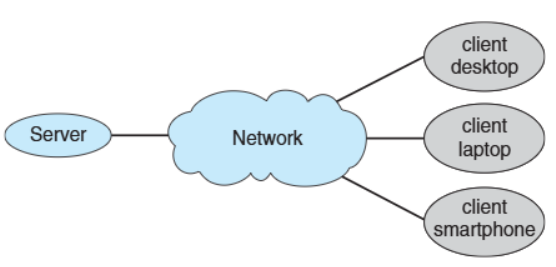
Client-Server Connection Structure
Peer-to-Peer(P2P)
📚 P2P is another type of distributed system where nodes connect directly with each other 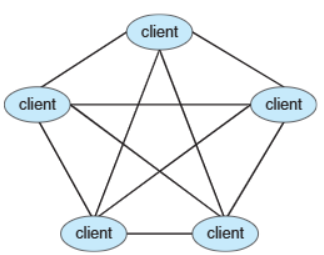
P2P
✅ Key feature of P2P
- No distinction b/w clients and servers
- All nodes are treated as peers
- Each node can act as a client, server, or both depending on the situation
- A node must join the P2P network to participate
→ How to Join a P2P Network- Register Service: Nodes register their services with a central lookup service on the network
- Broadcast Request: Nodes broadcast service requests and respond to requests using the discovery protocol(네트워크에서 서비스를 찾고 상호 작용을 돕는 protocol)
- Examples of P2P:
- Napster, Gnutella
- VoIP(Voice over IP): like Skype
Cloud Computing
📚 Cloud Computing: Delivers computing, storage, and applications as services over a network
- Cloud computing is a logical extension of virtualization
- EX: Amazon EC2 - Provides thousands of servers, millions of virtual machines, and massive storage ✅ **Type of Cloud Computing**: 1. 🌐 Public Cloud: Available over the Internet to anyone willing to pay 2. 🏢 Private Cloud: Operated internally by a company for its own use 3. 🔄 Hybrid Cloud: Combines public and private cloud components
✅ **Cloud Service Models**:
- SaaS(Software as a Service)
- Delivers software applications via the Internet (i.e. word processor(Google Docs, Microsoft Office 365))
- PaaS(Platform as a Service)
- Provides a platform for developers to build and deploy applications (i.e. database server)
- IaaS(Infrastructure as a Service)
- Offers infrastructure resources like servers and storage over the Internet(i.e. storage available for backup use)
- Components of Cloud Computing
- Traditional OSes
- VMMs (Virtual Machine Managers)
- Cloud Management Tools
- Internet connectivity requires security tools like firewalls
- Load Balancers: Distribute traffic across multiple applications(to ensure no single server is overloaded)
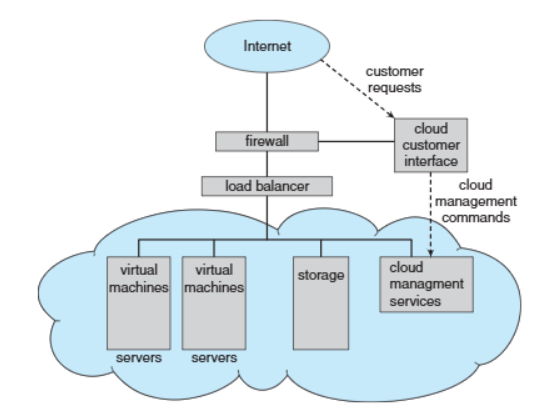
Cloud Computing
Real-Time Embedded Systems
📚 Real-Time(실시간) Embedded Systems
- Most prevalent form of computers today
Use special-purpose OS designed for specific tasks(Ex: Real-Time OS(RTOS))
- Some systems have OS, while others operate without an OS
✅ Feature of Real-Time OS(RTOS)
- Well-defined, fixed time constraints for processing
- Processing must be completed within the specified time(Failure to meet deadlines results in system errors)
- Correct operation only if constraints met